

Stay connected to your Network
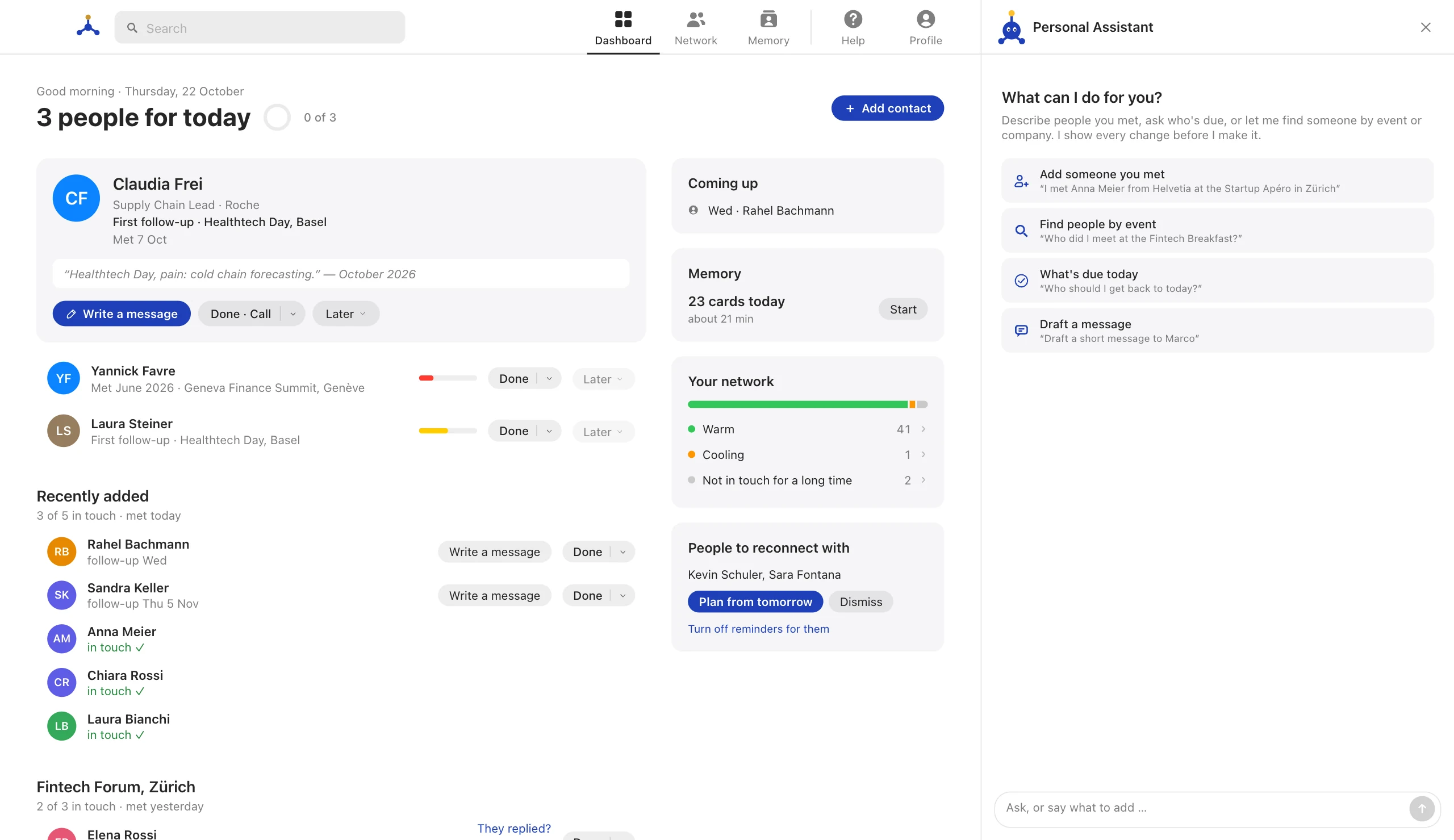
When you meet someone, you want to stay in touch. The Ventranet RMS calculates the right time to reach out again. The algorithm is based on the contact history you’ve logged with that person. This also helps you remember what you last talked about and who you met at which event.
Your own copy of a sample network, with Veni as your guide. No account needed, and it’s yours for 24 hours.
What the RMS is for
Most contacts are lost the same way: you meet someone good at an event, you mean to write, and three months later it feels too late. The RMS is there so that does not happen.
The RMS never contacts anyone on your behalf. It reminds you, drafts if you ask, and leaves the sending to you.
Keeps every contact warm
- A warmth bar next to every person
- Due when it’s time to reach out
- Importance from 1 to 10 sets the rhythm
- One short summary of who’s due
Your personal assistant
- Tell it whom you met, in one sentence
- Ask who is due, or about anyone
- Drafts a message in your style
- Changes nothing without your Yes
Never forget a name
- Flashcards for names and faces
- Face → Name, Name → Role, How you met
- Each card returns just before you’d forget
- A few minutes, right on your Dashboard
How can Veni help you?
“I met Anna Meier from Helvetia at the Startup Apéro in Zürich”
Tell Veni whom you met, in one sentence. You check the details, then confirm.
“Who should I get back to today?”
See who is due today, and who comes next.
“Who did I meet at the Fintech Breakfast?”
Find people by the event where you met them.
“Draft a short message to Marco”
Get a draft to copy. Veni never sends anything itself.
“Log a call with Marco: talked about the pilot”
Log a call, a coffee or a message in one line.
Warmth & due
The bar next to every person, and when someone is due.
- The warmth bar
How warm a relationship still is, and what each colour means.
- Due and the next reach-out
When someone comes up to get back to, and how often.
- Importance
One number from 1 to 10 that sets how often someone comes up.
- When a tie goes dormant
How long silence may last, and how to wake someone up.
- Touches
Comments, messages, calls and meetings, and how deep they were.
- Birthdays and other dates
Named dates show on your Dashboard 30 days ahead.
- The bin
Deleted people wait 30 days before they are gone for good.
How Memory works
Flashcards for names and faces, and how the schedule decides.
- How learning works
Spaced repetition: each card comes back just before you would forget it.
- Card kinds
Face → Name, Name → Role, How you met and more.
- Decks
Groups of people to learn together, by a rule or chosen by you.
The Personal Assistant
What it can do, what it may change, and what it never does.
- What the assistant can do
It reads your network, changes it after your Yes, and never sends anything.
- Cards, Yes and Undo
Every change shows as a card first and can be taken back.
- What it may change, and what not
Your settings by chat: reminders, being away, writing style. Never your plan or account.
- Limits
How much room the assistant has, shown in percent.
People
Add, log, edit, find and delete the people in your network.
- Add someone
From Network or the Dashboard, or just tell the assistant.
- Log a touch
Note a message, call or meeting, and the bar fills up again.
- Edit a person
Change name, role, importance, About or dates.
- Edit or delete a touch
A wrong date or note in the history? Fix it.
- Add a birthday
Or any other named date. It shows on the Dashboard 30 days ahead.
- Find people
Search, filters and sorting in Network.
- Delete and restore
Deleted people wait 30 days in the bin.
- Keep a form for later
Minimise a form, look something up, come back.
- About and notes
Who someone is goes into About. What they said on a day goes into a note.
Learning
Rounds, decks and what you learn.
- Start a round
A few minutes of cards, on the Dashboard or in Memory.
- Make a deck
By a rule that stays up to date, or with the people you choose.
- Choose what you learn
Which card kinds, and whom: everyone, importance 5+, or your decks.
Asking the assistant
Add people, ask who is due, draft messages, all by typing a sentence.
- Tell it whom you met
One sentence instead of a form.
- Ask who is due
Overviews, searches and questions about one person.
- Draft a message
In your style and ready to copy. The RMS never sends it.
- Answer its questions
When it is not sure, it asks with buttons.
- Undo what it did
Every change it made can be taken back.
- “Remember that …”
Things about you the assistant keeps for later conversations.
- Change settings by chat
Pause reminders, change your summary time or how it writes, just by asking.
- Stop, new chat, clear
Stop an answer, start fresh, or clear the conversation.
Your account
Reminders, plan, export, signing out.
- Pause reminders while away
Nothing is sent until you are back.
- The daily summary
One short list: who is due, whom to follow up, whose birthday is coming.
- Change your plan
See the plans and choose one, or change and cancel your plan.
- Export your data
vCard, a spreadsheet, or a complete copy.
- Sign out or delete your account
Where to find both, and how long you can change your mind.
Keep your whole network warm.
Start free with the people who matter most. Every paid plan keeps everyone warm and includes your Ventracard.
Free
For trying it with the people who matter most.
CHF 0
Start freeNo card needed
- Up to 10 people
- 1 own Memory deck
- AI assistant · 0.1×
Standard
For keeping your whole network warm.
CHF 9.90/ month
Get StandardCreate your account, then choose this plan. Cancel any time.
- Your whole network
- Unlimited Memory decks
- AI assistant · 1×
- Ventracard included
AI Plus
For drafting and finding people with the assistant.
CHF 14.90/ month
Get AI PlusCreate your account, then choose this plan. Cancel any time.
All of Standard, plus:
- AI assistant · 2×
AI Pro
For people who network every day.
CHF 46.90/ month
Get AI ProCreate your account, then choose this plan. Cancel any time.
All of AI Plus, plus:
- AI assistant · 10×
- 5× the room of AI Plus
Every plan includes reminders and the daily summary, Memory flashcards and export. Prices in Swiss francs, including 8.1 % VAT. Paid by card through Stripe, monthly or weekly. Change or cancel at any time.
Questions
Can I change or cancel at any time?
Yes. A larger plan applies at once: you pay the difference for the rest of the current period. A smaller plan, or cancelling, takes effect when the period you paid for ends. Nothing you saved is ever lost.
What is the AI allowance?
Each plan includes room for the assistant, shown in percent under Profile → AI Assistant. A week can use up to 40 % of the month; a weekly plan has only its weekly allowance. When a limit is reached, the assistant pauses until it renews. Everything else keeps working.
Can I pay weekly?
Yes. Every paid plan can be paid weekly. Over a year it costs a little more. The assistant gets the same room over the year, spread evenly over the weeks, with a weekly limit only.
What comes with every paid plan?
Your whole network, unlimited Memory decks and your Ventracard.
How do I pay?
By card, through Stripe, monthly or weekly. Prices include 8.1 % Swiss VAT. The RMS never sees your card number.
The studies behind the RMS.
When the RMS says it is time to get back in touch with someone, that rests on research, not on gut feeling: 67 scientific studies on memory and forgetting, on how strong and weak ties behave, and on communication and trust. Another 13 sources from CRM practice helped set the rhythms.